
GifTaTy
One thoughtful gift.
A little coordination.
Friends want to buy a gift together. Someone needs to hold it, invite the others, and make sure everyone still agrees when the group changes. I designed GifTaTy from the start, connecting wishlists, shared reservations, and the decisions that happen before a purchase.
01 THE COORDINATION PROBLEM
Choosing the gift was only the beginning.
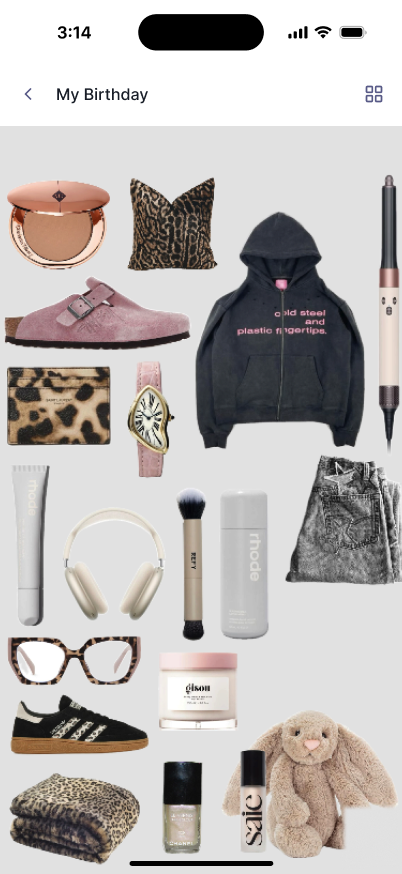
GifTaTy lets people create wishlists for birthdays and other occasions, then share them with friends. A friend can choose a gift individually or invite others to buy a more expensive gift together. The recipient stays outside the buying group.
That creates a coordination problem. While one group is deciding, another person might try to buy the same gift. Some invitees may decline or never respond. Fewer participants can mean a different cost for everyone who remains.
I worked as the sole product designer from the beginning, shaping requirements with the client and designing the first two phases across mobile and web.
02 RESERVATION & EXPIRY
Hold the gift while people decide.
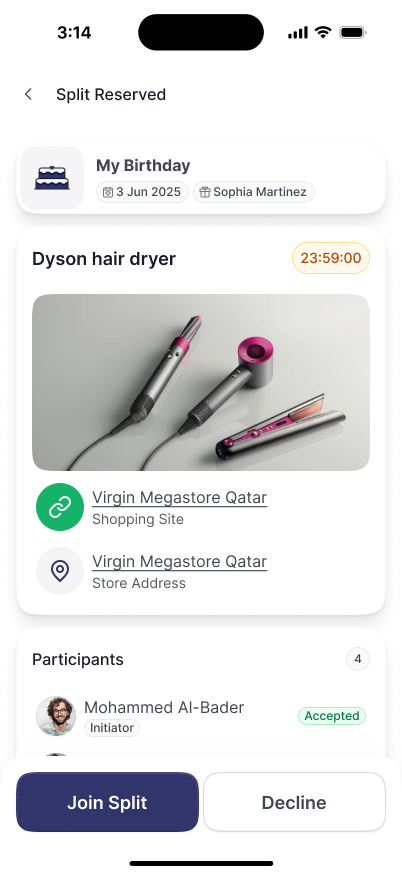
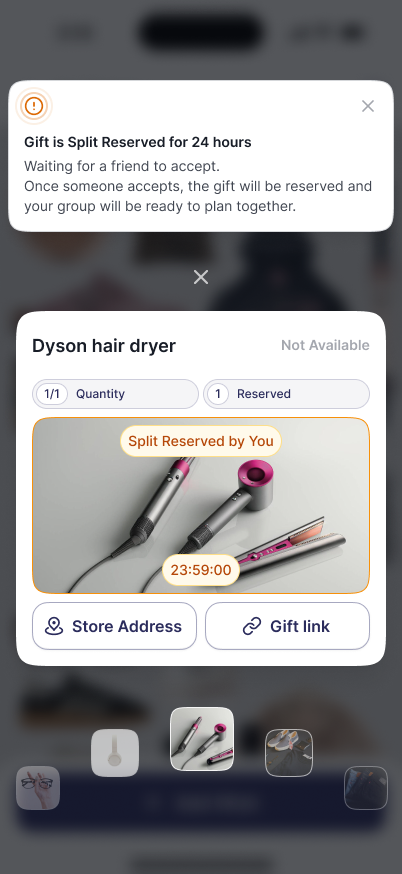
Starting a group purchase created a temporary reservation. The initiator selected friends, and each invitation required an explicit response. During that period, the gift was held so someone else would not reserve the same available item.
A time limit on indecision.
If the group did not confirm within the reservation window, the gift became available again. The initiator could restart the process, including choosing different friends.
- Reserve and invite.The initiator holds the gift and asks friends to take part.
- Collect responses.The group can see who has accepted and who is still pending.
- Confirm the arrangement or release the gift.An unresolved invitation should not keep an item unavailable indefinitely.
03 CHANGING PARTICIPANTS
Four people saying yes is different from three.
If someone declined, the remaining participants needed to see the new arrangement before committing. The review showed who was joining and how much each person would need to contribute. A smaller group could still proceed, but the changed cost needed to be understood and accepted.
People could cancel before the gift was purchased, including after the group had formed. Cancelling the reservation released the item; it did not represent a refund. The first version coordinated a purchase that happened elsewhere.
Invitees decide whether to join.
The gift is held temporarily while responses come in.
Make the new group and cost visible.
A change in participation needs a clear updated agreement.
Plan the purchase together.
The confirmed group can arrange the purchase. The recipient is not invited into this group.
Make the gift available again.
Unfinished plans release the reservation so another person can choose the gift.
Show the financial context.
The design explored equal splitting and open contributions, with target, individual amounts, and remaining balance in one place.
The first release did not collect purchase payments through GifTaTy. Wallet collection was explored for a later phase, so it is separate from the external-purchase story here.
04 RESERVATION VISIBILITY
The gift can be reserved without naming the giver.
A person could reserve a gift anonymously or use their name. Friends and the wishlist owner could see that a gift was reserved, with the identity shown according to the reserver’s choice.
This distinction mattered: an anonymous reservation hid who was buying, rather than hiding the reservation itself. It helped avoid duplicate gifts while giving the giver control over whether their name appeared.
05 GIFT RULES
Not every wish should disappear after one reservation.
Some gifts are intended to be bought once. Others can be received more than once, or are useful every month. A single “reserved” rule would not fit all three situations.
One item, several, or unlimited.
Gift setup supported a quantity and an unlimited option. Availability needed to follow the item’s quantity rather than treating every reservation as a permanent block.
A wish can come around again.
The design supported recurring gifts, including monthly needs, so a repeat commitment could be distinguished from a one-off gift.
Define the wish before coordinating the purchase.
These settings gave a reservation the context it needed. A friend could understand the requested item and use either a shopping link or a physical store location.
06 GIFT DISCOVERY
A thoughtful starting point when there is no wishlist.
A recipient might have a profile without a wishlist. I designed an AI-assisted route that used profile information and preferences to suggest gift ideas, giving the buyer a starting point rather than asking them to guess from scratch.
From preferences to possible gifts.
The profile design captured information such as interests, favourite colours, brands, and sizes. Suggestions could be explored further with shopping links or store information.
Recommendations supported the decision; the buyer still selected the gift and arranged the purchase.
07 THE FIRST TWO PHASES
Coordinate the purchase before becoming the checkout.
In the initial product scope, people could buy online or in person wherever they preferred. GifTaTy supported the planning, reservation, and conversation around the gift; it did not take the purchase payment.
The design also allowed a limited guest experience on mobile and web. People could begin with a small set of features, such as creating a wishlist, while inviting contacts required registration.
GifTaTy launched on iOS and web. Its public App Store listing describes wishlists, anonymous reservations, group gifting, and the AI Gift Assistant. View the App Store listing ↗
08 PRODUCT DIRECTION
A route from useful suggestions to a business model.
Beyond the first release, I proposed bringing retailers into the product. A person looking for a gift could discover relevant sellers, while GifTaTy could explore a commercial relationship with those stores.
Earn from a purchase referral.
Participating shops could pay a commission on purchases referred through GifTaTy.
Give retailers a digital storefront.
A separate option was to charge stores for joining the platform and maintaining a product presence.
I presented comparable examples to the client, and these ideas were accepted into the future feature list. They are product direction proposals, not claims of realised revenue or a launched retailer marketplace.
09 REFLECTION
Make the commitment as clear as the gift.
The most demanding part of the flow was the agreement around a gift: who was joining, what each person expected to contribute, how long a reservation could remain pending, and what happened when plans changed.
Separating a temporary hold from a confirmed arrangement made those states easier to explain. Separating reservation visibility from giver identity preserved another important choice: a person could prevent a duplicate gift without revealing their name.
Across the first two design phases, I worked on making those commitments visible before asking people to move forward.